How to Build and Measure Digital Resilience: The Role of Disaster Recovery (DR) and Business Continuity Planning (BCP)


In a Nutshell
In today's fast-moving threat landscape, having a solid digital resilience strategy is no longer optional—it's a business must-have. Building true digital resilience comes down to understanding how two key pieces fit together: Business Continuity Planning (BCP), which is your big-picture game plan for keeping operations moving during a crisis, and Disaster Recovery (DR), the technical backbone focused on getting your IT systems and databases back online fast. How do you measure if it works? By tracking downtime metrics like Recovery Time Objective (RTO) and Maximum Tolerable Period of Disruption (MTPD), alongside data loss limits like Recovery Point Objective (RPO) and Maximum Tolerable Data Loss (MTDL). Modern enterprise business continuity relies heavily on public cloud infrastructure and hybrid cloud disaster recovery architectures to cut out the cost of idle hardware and automate the whole recovery process. Just keep in mind that moving to the cloud means working under a shared responsibility model—keeping your data and apps safe from ransomware attacks is always on you.
Listen to article summary
0:00 / --:--
1x
Audio generated by AI (ElevenLabs). May contain errors.
Imagine getting a phone call at 4:27 AM with some nightmare news: your company’s data is completely gone. Invoices, customer databases, active projects, your entire history—either locked up by a cyberattack or completely wiped out. Is your business actually ready for a scenario like that?
With cyberthreats hitting companies harder than ever, keeping your business running and having a rock-solid data protection strategy are the absolute baselines of security. Risk isn't just a theoretical worry anymore—according to data from Check Point Research, organizations worldwide now face a staggering average of nearly 2,000 cyber attacks per week, with global weekly attacks surging significantly year-over-year.
The financial impact of a successful attack can be a massive blow to any company. Data from Splunk Inc. and Oxford Economics shows that system outages and cyber incidents trigger an average 9% drop in company stock prices, and bouncing back to pre-crisis valuations takes an average of 79 days. On top of that, you have to deal with direct revenue loss and customers leaving for competitors.
So, how do business leaders protect themselves against disruption that often feels inevitable? The secret is building smart organizational cyber resilience. To get there, you need a clear, practical understanding of Business Continuity Planning (BCP) and Disaster Recovery (DR). These two crisis management strategies work hand in hand to help you manage operational risk and keep the lights on when things go wrong.
After reading this piece, you'll know:
- Real-world definitions and technical differences between Disaster Recovery (DR) and Business Continuity Planning (BCP).
- The core tech pillars you need for an effective enterprise business continuity solution.
- The essential cybersecurity metrics and data-loss KPIs you should be tracking.
- How the public cloud and a hybrid approach are completely redefining modern data protection standards.
What is the Difference Between Business Continuity Planning (BCP) and Disaster Recovery (DR)?
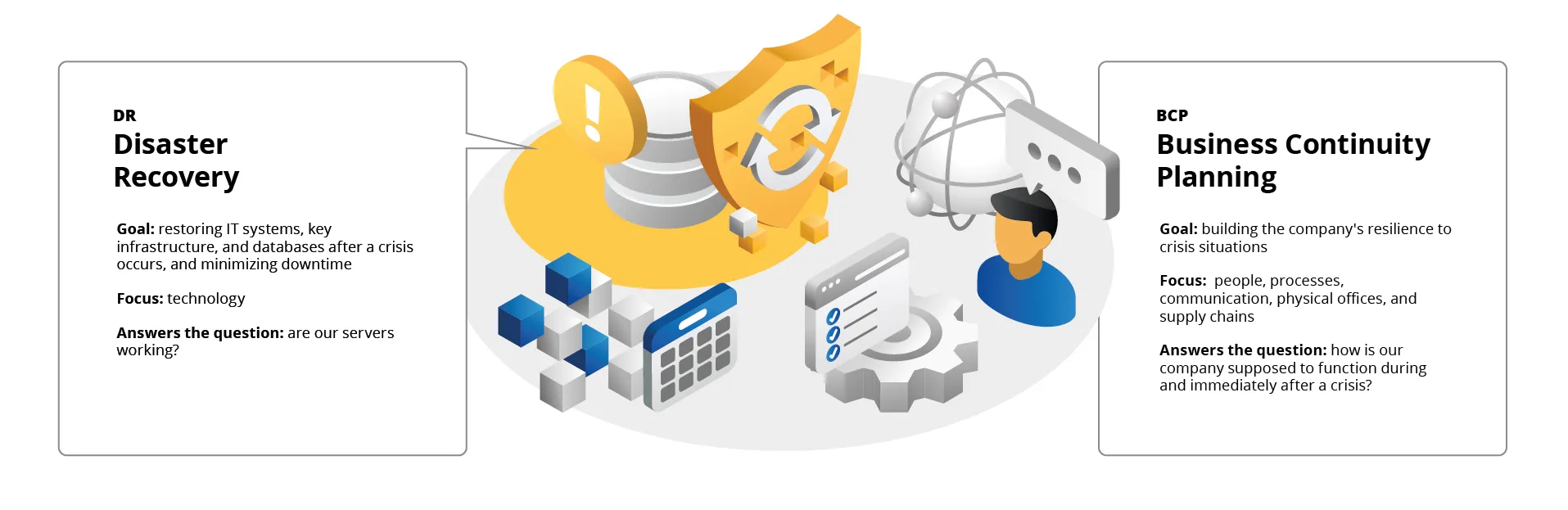
The terms Disaster Recovery (DR) and Business Continuity Planning (BCP) are often used interchangeably. In reality, Disaster Recovery is the technological heart of a much larger organism, which is Business Continuity Planning.
What is Disaster Recovery (DR)?
Disaster Recovery (DR) is a strictly defined set of procedures, technologies, and policies that allow for the recovery of IT systems, key infrastructure, and databases after a crisis occurs (such as a power outage, a ransomware cyberattack, or a natural disaster). DR focuses specifically on the technical and technological aspects. Its main goal is to minimize downtime and protect against the loss of critical business data by utilizing solutions like backup data centers.
What is Business Continuity Planning (BCP)?
Business Continuity Planning (BCP), on the other hand, is a more comprehensive business strategy. While DR focuses on how to get IT systems up and running, BCP answers the question of how the entire company is supposed to function during and immediately after a crisis. The definition of BCP covers not just infrastructure, but also people, processes, communication, physical offices, and supply chains. For example, if your servers are up, but your employees have nowhere to work from or no way to talk to each other, your DR plan worked, but your BCP failed.
Technological Pillars of Business Continuity Planning (BCP)
For a BCP strategy to actually work, it should combine several tools at once. It requires a layered approach where each technology targets a different kind of risk—ranging from a single deleted file or a server room fire, all the way to legal penalties for non-compliance. Below are a few examples of solutions that can (and should) make up your plan.
1. Backups: Everyday Data Hygiene
A backup is your first and most basic line of defense. Think of it as "operational insurance" against everyday, local hiccups.
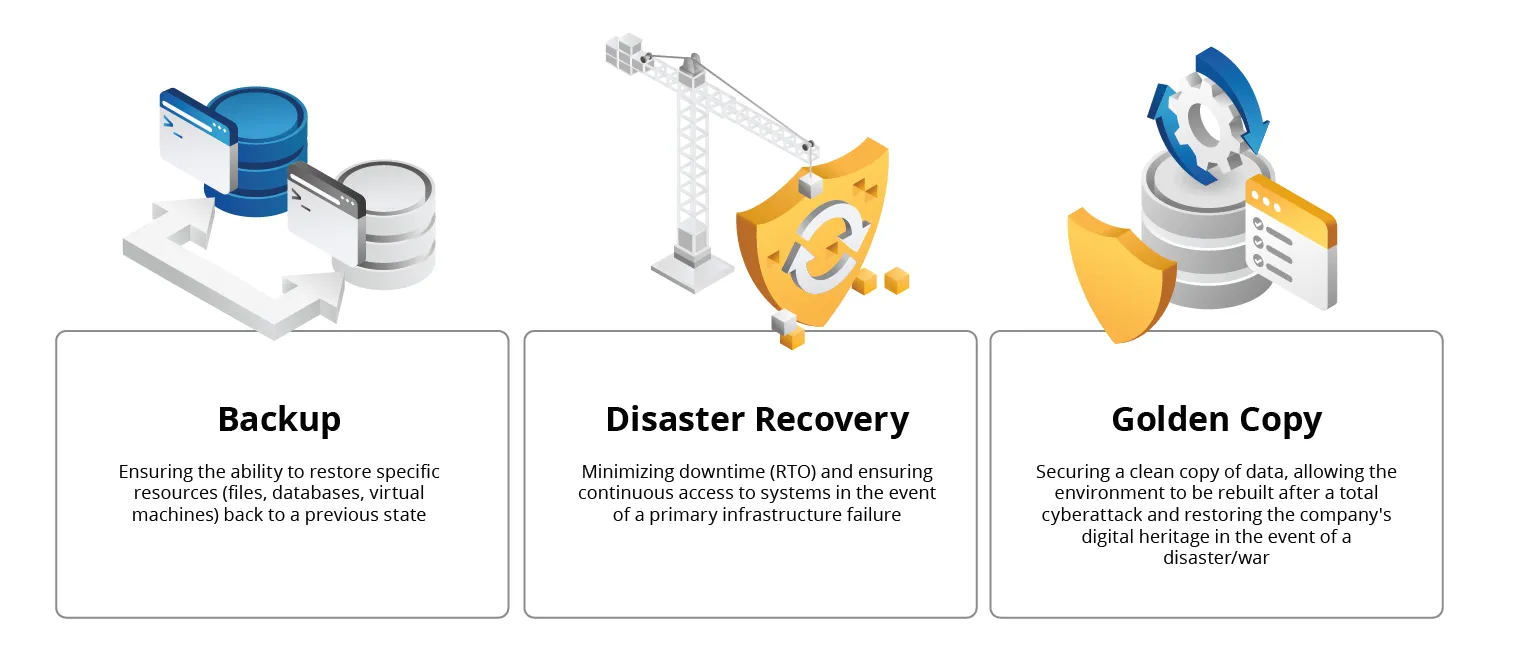
Role in BCP: Ensuring you can restore specific resources (files, databases, virtual machines) back to a previous state.
Main Tasks:
- Protection against accidental deletion (human error).
- Protection against data corruption (corrupted files, application errors).
- Providing historical file versions (e.g., "I need last week's budget version").
Implementation Complexity: Low/Medium
Modern solutions are mostly "set and forget"—installing agents and configuring backup schedules is usually a straightforward process.
Maintenance Complexity: Medium
The real challenge here is scale. When you are managing hundreds of servers, you need to constantly monitor whether the backup process completed successfully (tracking the success rate). Managing disk storage space and retention policies can also become an issue.
2. Disaster Recovery (DR): A Lifeline for Business
If a backup is a "spare tire," DR is a "spare car." In a BCP strategy, Disaster Recovery is responsible for the organization's survival when the main headquarters or data center stops existing or working.
Role in BCP: Minimizing downtime (RTO) and enabling employees and customers to use systems even when the primary infrastructure is unavailable.
Main Tasks:
- Replicating data and systems to a second location (or cloud) in near-real time.
- Automating the failover process and spinning up backup systems.
- Orchestrating the network so that users are automatically redirected to the working data center.
Implementation Complexity: High
It requires not only tools (like Zerto, Commvault, VMware Live Site Recovery aka SRM) but, above all, network design, IP address mapping, and understanding the dependencies between applications.
Maintenance Complexity: High
It requires regular, more or less invasive testing. Every single change in the production environment (a new server, a network change) must be reflected in the DR plan—otherwise, the emergency system will not work.
3. Golden Copy (Cyber Recovery): The Last Bastion of Protection
In the age of cyberattacks, standard backups and DR plans can be encrypted right along with your production data. A golden copy is a specialized element of BCP geared toward building cyber resilience. It can—and should—also be treated as the ultimate line of defense in a total physical catastrophe scenario (the destruction of all data centers). This is possible under one key condition: location.
Role in BCP: A guarantee that we have a clean, uninfected copy of the data to rebuild the environment after a total ransomware attack. It also enables the restoration of a company's so-called digital heritage in the event of a widespread disaster or war.
Main Tasks:
- Blocking the ability to edit or delete data for a specified time (even for administrators).
- Isolating the copy from the production network (physically or logically) so a hacker cannot access it, allowing data to be restored on temporary compute resources or after infrastructure is rebuilt, even if all compute centers are lost.
- Security scanning—meaning the verification of the copy for malware before data recovery.
Implementation Complexity: Medium/Low
It requires appropriate hardware (such as storage arrays with object locking, tapes) or dedicated cloud services, along with restrictive access policies.
Maintenance Complexity: Medium/Low
The key here is managing encryption keys and authentication processes (multi-person authorization is often required).
The ABCs of Security: Key Metrics for Disaster Recovery (DR) and Business Continuity Planning (BCP)
To effectively design both a BCP and DR strategy, you need to speak the language of metrics. They are exactly what draw the line between a minor hiccup and a full-blown company outage. Understanding the terms below is also key to establishing a budget and choosing the right technologies—it is impossible to protect everything without a bottomless pit of money—which is why setting hard limits is an absolute must.
1. RPO (Recovery Point Objective)
RPO defines the maximum amount of data a company can lose as a result of a failure, measured in time. In practice, this parameter determines how current the restored data must be—for example, an RPO of 4 hours means that systems must be restored to a state no older than 4 hours ago.
Example: If the RPO is 4 hours and a failure occurs at 12:00, the system will restore data current as of 08:00. Everything entered between 08:00 and 12:00 is lost.
Good to know: The lower the RPO (e.g., near zero), the more frequently we must perform backups or replication, which drastically increases the cost of the solution.
2. RTO (Recovery Time Objective)
RTO defines the maximum acceptable time it should take to restore business processes or IT systems after a failure. In other words, it is a declaration of how quickly the organization must regain operational capability.
Example: If a critical database crashes and the RTO is set to 2 hours, the technical team has exactly 120 minutes to make the system fully operational again for users.
Good to know: A short RTO requires high automation, continuous monitoring, and lightning-fast response procedures (such as automated failover tools), which, naturally, drives up infrastructure maintenance costs.
3. MTPD (Maximum Tolerable Period of Disruption)
MTPD is the absolute maximum timeframe your business can handle a disruption before hitting a point of no return—leading to catastrophic, irreversible damage like bankruptcy, a ruined reputation, or severe legal penalties.
Good to know: MTPD is always greater than or equal to RTO. It serves as an upper bound that your technical strategy (RTO) must never cross if the business is to survive.
Warto wiedzieć: RTO must always be shorter than MTPD. If the MTPD for a company is 24 hours of downtime, your RTO should be, for example, 12-16 hours in order to maintain a safety margin for unforeseen problems during recovery, allow for data consistency verification, and restore business processes.
4. MTDL (Maximum Tolerable Data Loss)
MTDL is the business equivalent of the technical RPO. It defines the amount or value of data (e.g., number of transactions, customer records) whose loss is "acceptable"—meaning it will not critically disrupt the company's operations.
Good to know: MTDL dictates RPO. If the business states that the MTDL is "a maximum of 100 lost orders," and during peak hours 100 orders come in per minute, then the technical RPO must be under 1 minute. MTDL is often used in the context of BCP to make management realize that a "once-a-day backup" (RPO = 24h) is unacceptable given their business requirements.
Public Cloud as a Turbocharger for BCP and DR
You already know that BCP is a survival strategy, and DR is more of a lifeline. The public cloud (e.g., AWS, Microsoft Azure, Google Cloud) changes the way these technologies are delivered, making previously unachievable RPO and RTO parameters attainable for companies that do not possess a large budget. Below are a few key reasons why the public cloud completely blows the traditional "second server room" approach out of the water:
1. The End of Zombie Data Centers
In the traditional on-premise model, to ensure a low RTO (a quick return to work), you have to maintain a second, nearly identical server room, which stands idle for 99% of the time, consuming electricity and licenses—a so-called zombie data center.
Cloud Advantage: By switching to the pay-as-you-go (PAYG) model, you don't have to shell out cash for full compute power when it's just sitting idle. You can maintain a so-called pilot light—meaning a minimal, inexpensive infrastructure in the cloud that stores a replica of the data and maintains a network node and a directory service. Only at the moment of a disaster do you boot up hundreds of servers, paying for them only when they are actually saving your business. An important aspect is that cloud providers are able to offer licenses in the PAYG model. In a traditional scenario, the mere purchase of licenses often caused clients to give up on this type of solution.
2. Geographic Reduncancy Out-of-the-Box
There is no denying that building your own backup data center in another city (not to mention another continent) is a logistical and legal nightmare.
Cloud Advantage: Cloud technology providers have regions all over the world. With just a few mouse clicks, you can configure data replication from Warsaw to Frankfurt, Dublin, or Singapore. This makes BCP resilient to regional disasters (floods, earthquakes, wars), which would be extremely difficult to achieve in a traditional model.
3. Infrastructure as Code (IaC), meaning a new definition of the runbook
A traditional recovery plan (runbook) is often a lengthy PDF document that must be read and manually executed step by step, which—especially under stress—leads to many mistakes.
Cloud Advantage: In the cloud, you can describe your entire infrastructure (networks, servers, security measures) as code (e.g., Terraform, Bicep, CloudFormation). Rebuilding a complex environment isn't about clicking around manually—it's about firing up a single script, which aggressively slashes your RTO and allows you to eliminate many errors.
4. Disruption-Free Testing
This is an often overlooked, yet highly critical aspect. In traditional IT, DR tests are difficult, may require halting production, or are risky for running systems, which is why they are done rarely (or not at all).
Cloud Advantage: At any time, you can spin up a copy of your environment in an isolated cloud network (a so-called sandbox), perform recovery tests, prove to auditors that your RPO/RTO metrics actually hold up, and then simply tear down the environment and stop paying for it.
Do Public Cloud Users Also Need BCP?
Yes! This is one of the most common and dangerous misunderstandings. Using the cloud does not absolve you of responsibility for your own data and applications. The shared responsibility model applies here, which we wrote about some time ago in the article Cloud Provider Liability: What Are the Available Market Models?.
The division of responsibility can be presented as follows:
- The cloud provider (e.g., Google, Azure, AWS) is responsible for security of the cloud, meaning the physical infrastructure (buildings, power, network).
- You (cloud user) are responsible for security in the cloud, meaning your data, applications, network configuration, access management, and protection against ransomware.
An outage of an entire availability zone or even a whole cloud region, although rare, is possible. A ransomware attack that encrypts your virtual machines in the cloud is an extremely real scenario these days. For example Poland, according to a report by ESET, in the second half of 2025, was the country with the third highest number of detected ransomware attacks in the world. Therefore, every company that uses the public cloud should have a plan that involves at least replicating key data and systems to another geographical region of the same provider. Of course, using other providers is possible, but it is a scenario that is used relatively rarely due to its complexity.
Summary
Knowing the theory is one thing, but actually pulling off a successful Disaster Recovery strategy and BCP rollout is a whole different ball game. There is no one-size-fits-all template for security, so before you decide on specific tools, make sure they definitely account for the unique nature of your organization and its needs. Ask yourself: is a solid backup enough for you, or is full Disaster Recovery necessary? Where is it critical to implement a golden copy as the ultimate line of defense against ransomware?
If you feel that you need support in this area and a partner who will guide you through the entire process—from a blank slate to a fully prepared contingency plan—contact our experts using the form below.
At OChK, in addition to services such as Backup as a Service, Disaster Recovery Center (DRC), or the golden copy, we:
- design secure landing zones in compliance with security best practices (CIS Benchmarks),
- prepare isolated networks (so-called bubble networks/sandboxes) that allow for regular recovery testing with zero impact on production systems,
- create detailed failover and failback procedures,
- deliver ready-to-use runbooks to the client—meaning step-by-step instructions that will support your team during a high-stress outage,
- conduct the first tests together with the client, verifying the assumed RPO and RTO metrics in practice.
As strategic partners of global providers (Google Cloud and Microsoft Azure) and creators of our own infrastructure, the OChK Platform, we offer a cloud-agnostic approach. We design architecture that leverages the potential of the public cloud for systems that require it, while simultaneously utilizing our own cloud for data that demands a special approach or specific performance metrics. This hybrid approach allows us to optimize costs and meet regulatory requirements (such as DORA or NIS2) that cannot be fulfilled by a single provider.
Glossary
Business Continuity Planning (BCP)
Business Continuity Planning is a comprehensive, documented set of procedures, policies, and resources aimed at ensuring the uninterrupted functioning of an organization's critical business processes following a serious failure, disaster, or other disruptive event (e.g., flood, cyberattack, epidemic). The BCP strategy focuses on the operational recovery of the entire organization within defined time and quantitative objectives (such as RTO, Recovery Time Objective, and RPO, Recovery Point Objective), thereby minimizing financial and reputational losses.
Backup
Backup is the process of regularly creating and securely storing copies of original digital data on a separate medium or in a dedicated cloud storage space. The purpose of creating backup copies is to enable lossless data recovery in the event of accidental deletion, corruption, ransomware encryption, or hardware failure.
Golden Copy
Golden copy is an immutable, fully verified, isolated, and authoritative backup of critical data or system configurations, serving as the single source of truth. It is stored in a way that prevents any modification (often in WORM - Write Once, Read Many mode) or in an environment completely disconnected from the production network (air-gapped), serving as the ultimate line of defense against destructive ransomware attacks.
Digital Resilience
Digital resilience is an organization's capability to continuously anticipate, absorb, adapt to, and rapidly recover from all types of digital disruptions, technological failures, or cyberattacks. It goes beyond simple incident response, representing a comprehensive business and technology strategy that ensures the uninterrupted delivery of critical services even under crisis conditions.
Disaster Recovery (DR)
Disaster Recovery (DR) is a comprehensive set of strategies, procedures, tools, and infrastructure resources designed to restore critical IT systems and network operations following a major disaster (such as a server room fire, flood, or massive cyber outage). DR focuses on the technical and technological aspects within the broader Business Continuity Plan (BCP).
Maximum Tolerable Period of Disruption (MTPD)
MTPD is the maximum timeframe that an organization can tolerate the total unavailability or severe disruption of a specific business service or system before the losses become irreversible and threaten the very survival of the company. It is a baseline business metric that establishes the framework for technical recovery metrics (RTO must be less than MTPD).
Maximum Tolerable Data Loss (MTDL)
MTDL is a business-defined maximum allowable volume or age of data (measured in time) that can be lost due to an outage without causing permanent operational or financial paralysis to the organization. Similar to temporal relations, MTDL sets the absolute maximum limit for the technical RPO.
RPO (Recovery Point Objective)
RPO is a technical metric specifying the maximum age of data an organization can tolerate losing due to an outage, measured backward from the moment of the incident to the time of the last successful backup. For instance, an RPO of 4 hours means systems must be backed up at least every 4 hours, and the business accepts losing at most that amount of work.
RTO (Recovery Time Objective)
RTO is a technical metric specifying the maximum allowable time that can elapse between the occurrence of a failure or disaster and the full restoration of operational capability for a given IT system or service. If the RTO is 2 hours, it means the engineering team and DR infrastructure must spin up the production environment within 120 minutes of the incident declaration.
Zombie data center
Zombie data center is a colloquial term for a server infrastructure or an entire data center where a significant portion of hardware resources (CPUs, RAM, storage) continuously consumes power and incurs maintenance costs despite executing no useful operations or processing active business traffic. Identifying and eliminating such "zombie servers" is a key component of IT cost optimization and cloud migration.